
SRT Streaming
Secure Reliable Transport (SRT) is a widely used protocol for transporting audio, video or arbitrary data streams over IP networks. It compensates for packet loss, jitter and fluctuating bandwidth while maintaining stream integrity and low latency.
SRT is particularly useful when transporting EIT streams securely over public or unmanaged IP networks — for example when the multiplexer is located at a remote uplink site.
cherryEPG does not generate SRT natively. Instead, the SRT stream is created
using the external open-source tool srt-live-transmit, which relays the
locally generated UDP multicast stream to a remote SRT destination.
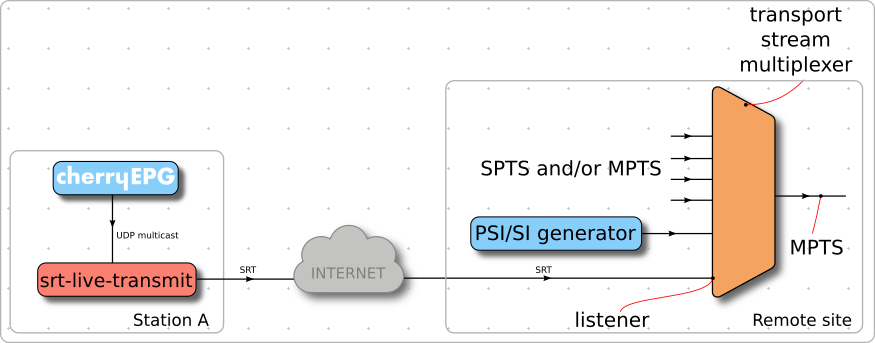
Figure 1 - Signal flow between cherryEPG and a remote DVB-MPEG-2 transport stream multiplexer
This approach allows secure and reliable transport of EPG data without the need for VPN tunnels.
Follow the steps below as cherryepg user to implement a simple SRT relay on your cherryEPG installation.
-
Install the required SRT tools:
sudo apt update
sudo apt install srt-tools
Verify installation:
which srt-live-transmit -
Setup the srt relay daemon by creating a systemd user service.
Create the following file:
/var/lib/cherryepg/.config/systemd/user/srt-relay.serviceand insert the content below:
[Unit] Description=SRT Live Transmit Relay After=network-online.target Wants=ringelspiel.target [Service] Type=simple ExecStart=/usr/bin/srt-live-transmit udp://239.10.10.1:5500 \ srt://<destination-ip>:<port>?mode=caller&latency=200&passphrase=<your-passphrase> Restart=always RestartSec=5 [Install] WantedBy=default.target -
Adjust configuration parameters and modify the following values according to your setup:
- <destination-ip>:<port> → IP address and port of the remote multiplexer (SRT listener)
- <your-passphrase> → Encryption passphrase for SRT
- 239.10.10.1:5500 → Multicast address and port defined in your cherryEPG scheme
The SRT passphrase must contain between 10 and 79 characters.
-
Enable and start the service by running the following command as
cherryepguser:systemctl --user daemon-reload systemctl --user enable srt-relay.service systemctl --user start srt-relay.serviceYou can check the service status with:
systemctl --user status srt-relay.serviceor get live logs:
systemctl --user status srt-relay.serviceYou should see connection establishment messages and packet counters.
-
Configure listener mode on the multiplexer and make sure the firewall allows the configured SRT port.
If authentication fails, verify that the passphrase matches on both sides.